


How To Play Popular VR Games For Free In 5 Minutes: A Quick Start Guide

Ready to dive into immersive virtual worlds without breaking the bank? In this guide, you’ll discover how to access and play popular VR games for free in as little as five minutes. Whether you own a high-end headset or use a mobile device, you can start exploring virtual realms sooner than you think.
Why should you care about free VR gaming? It lets you test a wide range of experiences before committing to paid titles, and it can introduce you to genres you might not have tried otherwise. But it’s important to understand the simple, actionable steps that make this possible, so you can skip the confusion and jump straight to the fun. Have you ever wondered how easy it could be?
Why Playing Popular VR Games for Free Is Worth Your Time
- Low-Risk Exploration: You can try diverse VR genres, from puzzle games to action adventures, without any upfront cost, helping you find what you enjoy most.
- Accessibility for All: Free VR options work with basic setups, including mobile phones paired with affordable headsets, so you don’t need high-end gear to join in.
- Skill Building: These free games can help you get comfortable with VR controls and movement, making it easier to transition to paid titles later on.
- Community Engagement: Many free VR games feature active player bases, giving you a chance to connect with other VR enthusiasts and share tips.
- Regular New Content: Developers often update free VR games with new levels or features, so you can keep enjoying fresh experiences over time.
Step-by-Step Guide to Playing Popular VR Games for Free in 5 Minutes
Step 1: Assess Your Current Hardware Setup
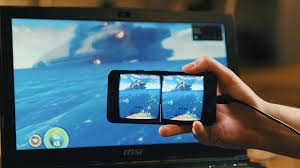
Start by checking what devices you have available. You can use a dedicated VR headset, a smartphone with a compatible cardboard headset, or even a PC with a webcam for some desktop VR experiences. Knowing your setup helps you narrow down which free games will work for you. Pro tip: If you’re using a smartphone, ensure it has a screen size of at least 4.7 inches for a better immersive feel.
Step 2: Choose a Trusted Free VR Game Platform
Research platforms that offer free VR games, such as Steam’s Free to Play VR section, Oculus App Lab, or Google Cardboard’s app store. Look for platforms that align with your hardware to avoid compatibility issues. Take a minute to read a few user reviews to find platforms with reliable, well-liked free titles.
Step 3: Download and Install a Compatible Free VR Game
Pick a popular free game that matches your hardware and interests—try a casual puzzle game if you’re new, or an action title if you crave excitement. Follow the platform’s instructions to download and install the game onto your device. Common mistake to avoid: Skipping the system requirements check, which can lead to lag or crashes during gameplay.
Step 4: Set Up Your VR Gear for Optimal Comfort
Adjust your headset to fit snugly but comfortably, making sure the lenses align with your eyes. If using controllers, pair them with your device and test the basic buttons to get familiar. For mobile setups, secure your phone firmly in the headset to prevent it from shifting during play. Do you feel ready to step into the virtual world?
Step 5: Launch the Game and Complete the Initial Tutorial
Open the game and work through any onboarding tutorials or setup prompts. These guides will teach you how to move, interact with objects, and navigate the virtual space. Take your time to practice these basics, as they lay the groundwork for a smooth gaming experience. After the tutorial, you’re ready to start playing your first free VR game!
Step 6: Troubleshoot Minor Issues for a Better Experience
If you encounter lag or blurry visuals, adjust your device’s settings, such as lowering the game’s graphics quality. For headset comfort, take short breaks every 15 to 20 minutes to stretch your eyes and neck. You can also check online forums for quick fixes to common issues with your specific game or setup.
Challenges to Be Aware Of
- Limited Feature Sets: Many free VR games offer fewer levels, modes, or customization options compared to paid titles, which can reduce long-term engagement for some players. You may need to switch between multiple free games to keep things fresh.
- Compatibility Hurdles: Some free VR games only work with specific headsets or devices, so you might not be able to access certain popular titles with your current setup. Checking requirements beforehand can help you avoid this frustration.
- In-Game Ads or Microtransactions: A number of free VR games include ads or optional microtransactions for extra content, which can interrupt your gameplay. You can often adjust settings to limit ads, but this may not be an option for all titles.
- Motion Sensitivity Risks: VR can cause mild motion sickness in some players, especially during fast-paced games. Starting with slower, casual free games can help you build tolerance over time.
Conclusion
You now have the foundation to start playing popular VR games for free in as little as five minutes. With the right setup and simple steps, you can dive into immersive virtual worlds without any upfront cost. Are you excited to start exploring?
Playing popular VR games for free offers a low-pressure way to discover new hobbies and connect with a global community of players. By mastering these quick steps, you’re positioning yourself to enjoy endless virtual adventures without straining your budget. Who knows what favorite game you might find?
Don’t wait for the perfect moment. Start assessing your hardware setup today. Every minute you spend exploring free VR games is a chance to unlock a new, immersive hobby that can provide hours of entertainment. What virtual world will you explore first?
FAQ
How long does it take to get comfortable with free VR games?
Most players get used to basic VR controls and movement within one or two short gaming sessions. Starting with slower, casual free games can help you adjust more smoothly. Take breaks as needed, and don’t rush yourself as you learn. Before you know it, you’ll be navigating virtual worlds with ease.
Do I need expensive gear to play free VR games?
No, you don’t need high-end gear to enjoy free VR games. Many options work with mobile phones paired with affordable cardboard headsets, or even PCs with basic webcams. Check the game’s system requirements first to ensure compatibility with your existing devices. You can start exploring VR without spending much at all.
What’s the best way to find reliable free VR games?
Start with well-known platforms like Steam, Oculus App Lab, or the Google Play Store, as they curate safe, popular free titles. Read user reviews to learn about other players’ experiences, and look for games with recent updates to ensure active development. You can also join VR community forums to get recommendations from fellow enthusiasts.
Can I use free VR games to prepare for paid VR titles?
Yes, free VR games are a great way to build familiarity with VR controls, movement, and immersion. Practicing with these titles can make it easier to transition to more complex paid games later on. You can even try free demos of paid games to get a taste of what full-priced titles offer before committing.



Most Read

How To Find The Ideal Rental House: Mastering Neighborhood Analysis And Lease Negotiation
Find Your True Cat's Personality For An Immersive Experience

The Truth About $1,000 Cars: A Canadian Guide To Hertz Used Cars And Low-Cost Realities

How To Find An Apartment Under $1,000: A Practical Guide For Tenants

How To Create Your Unique Avatar: A Practical Guide For Players
How To Uncover The Hidden Secrets Of Your Birthstone For Personal Insight
Subscribe For New Quizzes


Copyright © 2019-2026 | All rights reserved.